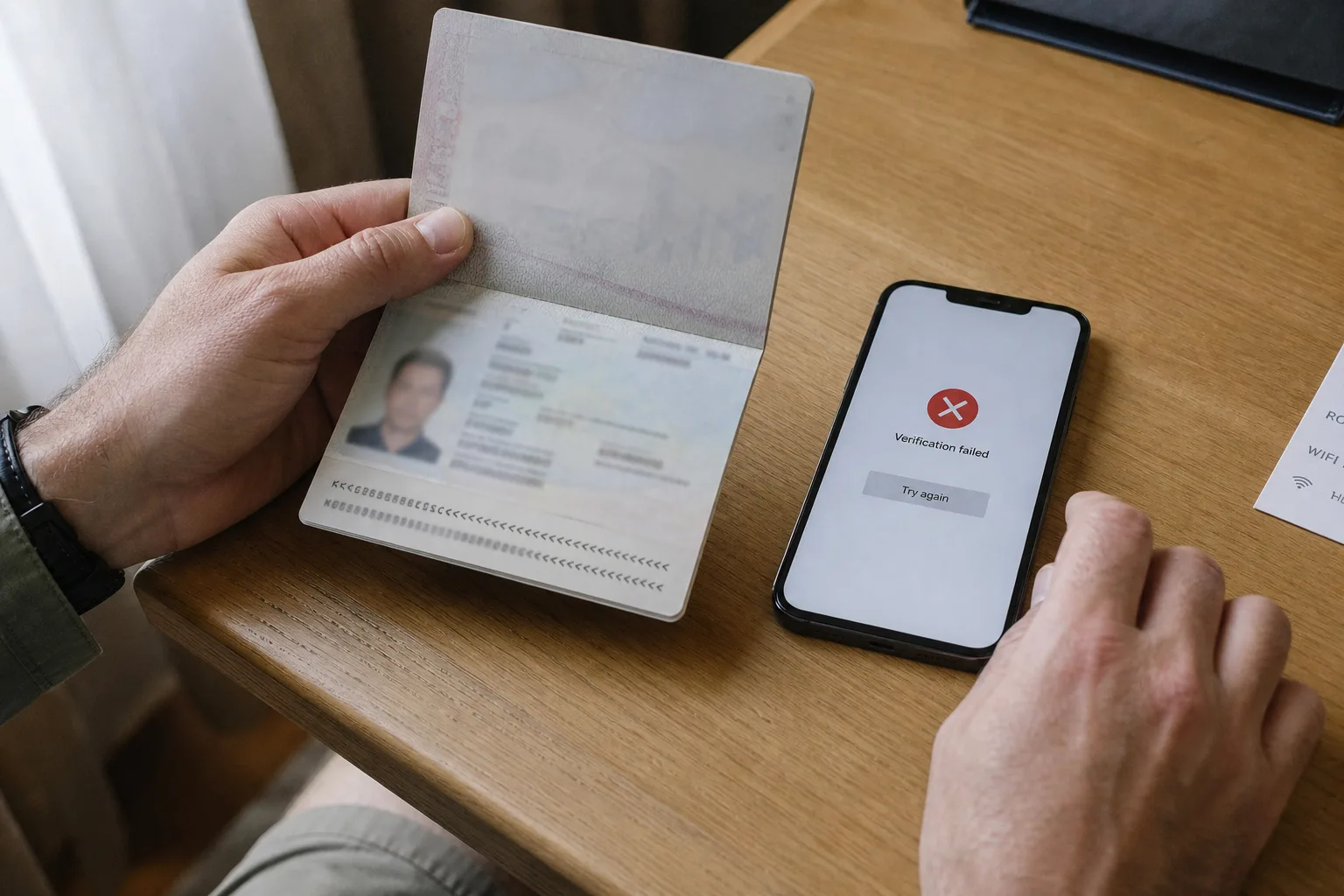


You've just walked out of a Chinese train station with a suitcase. Metro signs are in Chinese, taxi touts are already asking where you're going, and Uber doesn't work here.
DiDi is the app locals use instead — China's main ride-hailing service. For most first-time visitors it's the easiest door-to-door option when metro feels hard or you're tired and don't want to haggle. This guide is part of our Transport in China hub.

Quick Answer
You can usually hail a car with a foreign phone number that receives SMS, Alipay or WeChat Pay (often linked to an international card), and mobile data. Use the DiDi app, open DiDi inside Alipay or WeChat as a mini-program, or book from Amap (高德地图) taxi — same habits either way: check the destination name, match the license plate before you get in, pay in-app when the trip ends.
Payments not ready yet? Start here → China Payment Guide for Foreigners.
What You Must Have Before Booking
Three things — skip any of them and the first airport or late-night ride gets stressful.
1. Phone number that can receive SMS
DiDi (and most ride apps) need a number that can get verification codes. It doesn't have to be Chinese — plenty of travelers register with their home number. What fails is a data-only eSIM that can't receive SMS at all.
2. A payment method that works in China
Have at least one working option ready: Alipay, WeChat Pay, or whatever card/wallet the app offers you. International Visa/Mastercard often work once linked, but it depends on your bank.
→ China Payment Guide for Foreigners
3. Internet / data
Hailing, tracking, and chat all need a live connection. Install DiDi or Amap on hotel Wi‑Fi if you want — but keep mobile data on for the ride.
→ China SIM / eSIM for Foreigners
Ways to Book: DiDi App, Mini-Programs, or Amap
You don't have to install every app. Pick whichever stack you already have working.
Option A — DiDi app
- Download the official DiDi app from your App Store / Google Play.
- Switch the language to English if you see the option (or open Settings after install and change it there).
- Sign up with a phone number that receives SMS.
- Finish whatever profile checks the app asks for.
Option B — Alipay mini-program
- Open Alipay with verification done and a card that works.
- Search DiDi or tap the ride-hailing / taxi icon.
- Open the mini-program and make sure you can start an order.
- Confirm payment works inside Alipay before you need a car.
Option C — WeChat mini-program
Same idea if WeChat is already set up for you:
- Open WeChat → search 滴滴 / DiDi (or find it under mini-programs / services).
- Open the DiDi mini-program and allow location when asked.
- Make sure WeChat Pay is linked and can pay before you request a ride.
Handy when you don't want another app install — as long as WeChat Pay actually works on your account.
Option D — Amap (高德地图) taxi
If you already use Amap for navigation, you can hail from there too — look for the taxi / ride-hailing tab (打车). You'll still get a plate, car type, and in-app payment; the booking flow feels similar to DiDi.
Amap is often the better map for Chinese addresses and pickup pins, so some travelers search the place in Amap first, then tap taxi from that pin. More on Amap setup → Maps & Navigation in China.
Which should you use first?
- Alipay or WeChat already working → mini-program is fine
- Want clearest English + trip history → DiDi app
- Living in Amap all day → Amap taxi is convenient
Prices and available car types can differ slightly between entry points — always check the estimate before you confirm.
A Quick Real Example
Say you're in Dali and need a ride to Dali Ancient City (大理古城).
- Stand at a clear pickup spot (or the DiDi pickup point the app suggests).
- Tap Where to?, type the English name or paste the Chinese address — then pick the result that matches, including the right gate if options appear (South Gate is often the busy one).
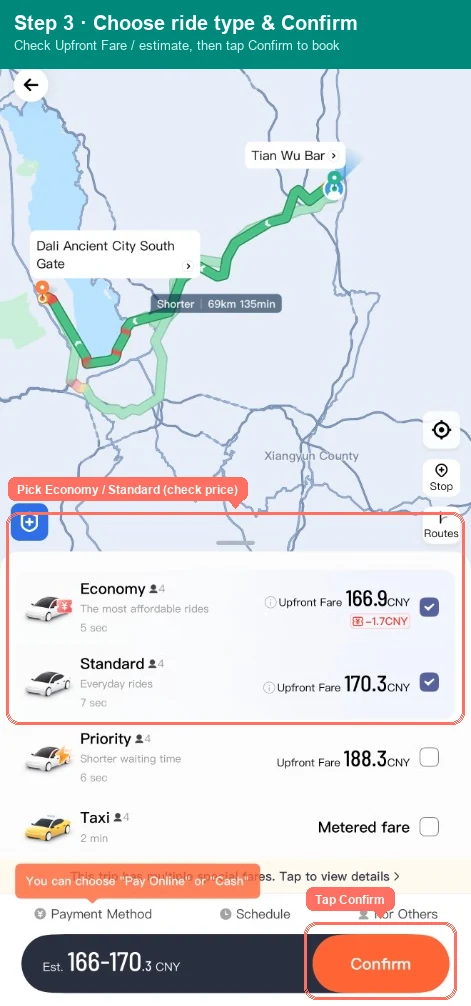
- Choose Economy, check the Upfront Fare / estimate, tap Confirm.
- When the car arrives, match plate + color + brand to the screen. If a random driver waves you over without an order, walk past them.
- After you get in, the app may ask for the last four digits of your number — show those only.
- When you arrive, pay in-app. No cash negotiation.
That's the whole loop. The annotated screenshots below use this same flow.
Step-by-Step: Book a Ride and Check the Driver
Search the correct destination
Confirm your pickup pin on the map, then set where you're going.
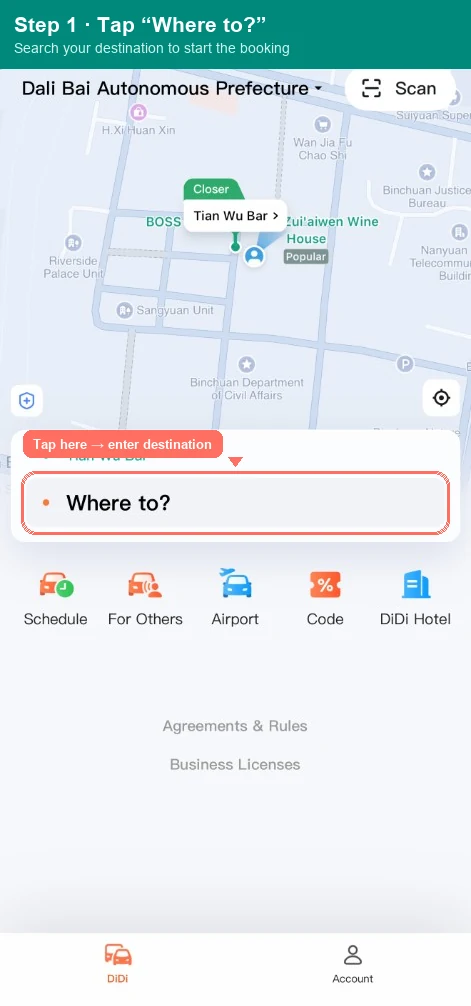
- Tap Where to? and type in English (for example “Bell Tower” or paste a Chinese address).
- Check both the English name and the Chinese name/address in the results.
- Pick the one that matches your plan — hotel, sight entrance, or metro exit, not a random residential compound with a similar name. If gate options appear (South Gate, North Gate…), pick the entrance that matches your plan.
- Optional: save places you use often.
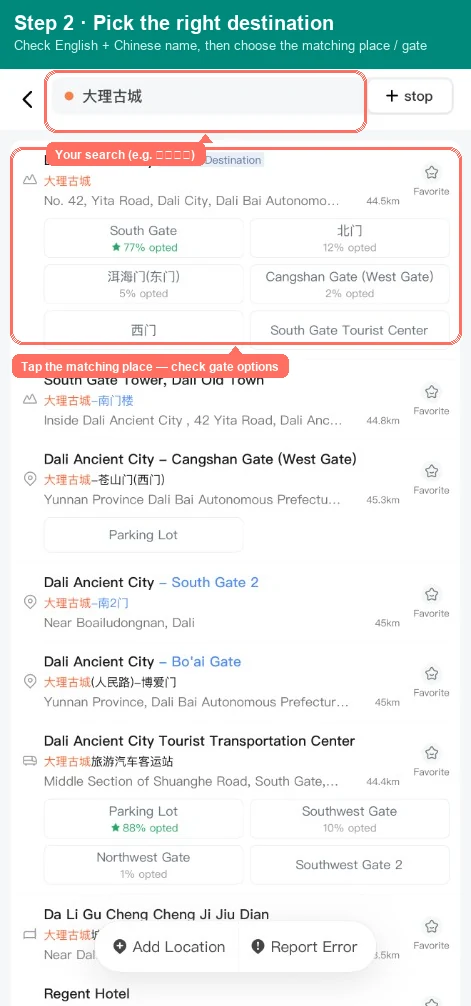
Practical tip: English works for big landmarks. For hotels and restaurants, paste the Chinese address from your confirmation into DiDi (or into Amap first). Guessing the Pinyin spelling is how people end up at the wrong gate. More on map quirks → Maps & Navigation in China.
At busy stations and airports, use the app's suggested pickup points when they appear — drivers look for you there.
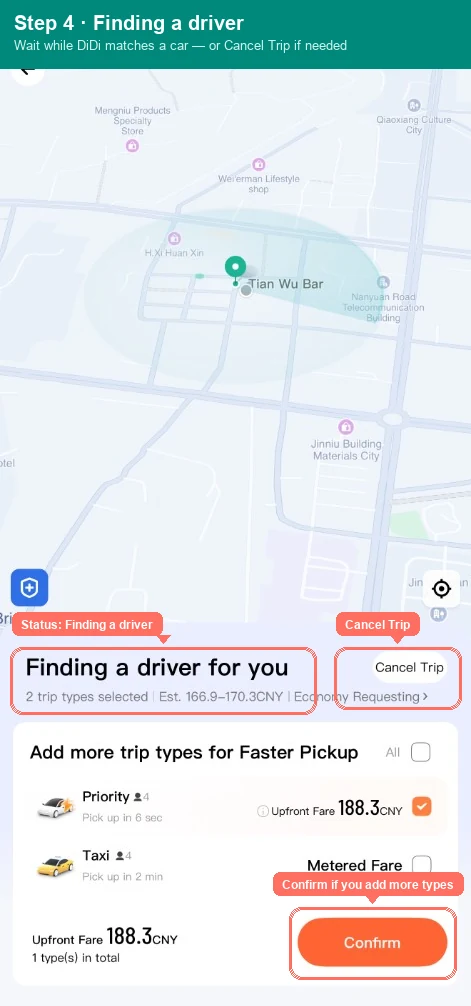
Choose your ride and wait for the driver
- Pick a ride type (Economy is the everyday default).
- Check the Upfront Fare or Estimated price before Confirm.
- Tap Confirm to request the car.
- While DiDi is matching, you'll see Finding a driver. You can Cancel Trip if needed, or add more ride types for a faster pickup.
- When a driver accepts, read the screen carefully: license plate, car color, brand, driver details.
- Track the car. Use Message (often auto-translated) for “I'm at Exit B.” Calling is harder if you don't speak Mandarin or your foreign number can't take local calls — chat is usually enough.
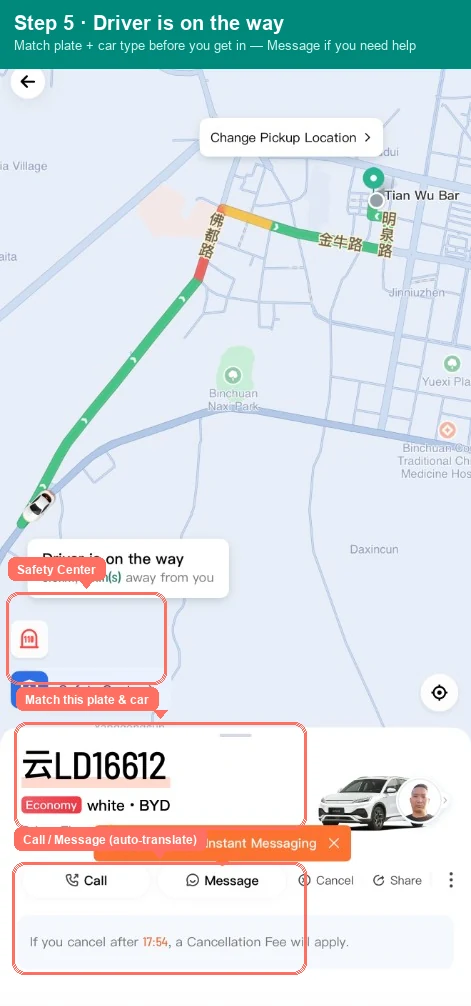
Don't get in until the plate and car type match. Ignore curb touts asking “taxi?” with no order — those are unlicensed 黑车.
After boarding: verify and stay oriented
- If the app asks, show the driver the last four digits of your phone number — not the full number.
- Confirm plate and car type again as you open the door.
- Watch the live route, distance, and ETA.
- Note where Safety Center sits on the screen — one-tap help if something feels wrong.
- Use Share if someone's waiting for you. Sit in the back and buckle up.
There's usually a short free-cancel window after you order — the app shows the cutoff. If the driver's stuck or hasn't moved for ages, cancel and request another car.
Fares, Receipts, and How Payment Works
When the trip ends:
- Open the trip summary. Check pickup, drop-off, time, and total.
- Look at the fare on screen — that's what you're paying. Tap Fare Breakdown if you want the detail.
- Tap Pay and choose a method that works (DiDi wallet options, WeChat Pay, or Alipay, depending on how you booked).
If the total looks off, pause before paying and check with the driver or in-app support. Trip history keeps the receipt.
Some cards put a temporary hold on your account, then settle the final fare later. A pending charge that looks high often drops to the real total — compare it with the trip receipt before you panic.
Payment setup failing? → Alipay / WeChat verification troubleshooting
FAQ and Small Tips
My order failed or the price looks strange.
Check internet, GPS, and payment first. Try again outdoors, or switch car type.
The driver cancelled or isn't moving.
Cancel and call another car. Use Safety Center if you feel unsafe.
I don't understand a Chinese pop-up.
Screenshot it and translate, or show the driver and ask for help with that screen.
The map says I'm in the wrong place.
Move to open sky, refresh GPS, or set pickup as a nearby landmark.
No Chinese phone number — how do I reach the driver?
In-app messaging (auto-translate). “I'm at Exit B / north gate” is enough most of the time.
Can I ask the driver to wait and take me back later?
Sometimes — expect a waiting fee. Agree in chat before you leave the car, or just book two trips.
Do I need the DiDi app specifically?
No. DiDi inside Alipay or WeChat works for many travelers, and Amap taxi is a solid alternative if you already navigate with Amap. Same rule: match plate before you get in.
Always: match plate and driver before boarding · sit in the back · seat belt on · Safety Center or local emergency numbers if something feels wrong.
Related Guides
Cross-topic prep that makes DiDi smoother (same-topic guides are under Continue reading below):
- Payments in China — Alipay / WeChat for in-app rides
- Google Maps / Amap guide — addresses and pickup pins that actually work
Need help locking apps and payments before day one? Start with the Survival Kit. If Yunnan is already the region, the usual first loop is on First Encounter Yunnan.